
I used to choose AI video plans the same way most people do: I looked at the monthly price first.
That was a costly mistake.
After running repeated Kling 3.0 projects for short ads, creator videos, and client drafts, I learned a better metric:
Cost per usable clip.
This guide breaks down Kling 3.0 pricing from that practical angle. Not hype. Not generic “best plan” advice. Just the decision framework I actually use.
Why Most Pricing Comparisons Are Misleading
A lot of comparisons only ask:
- Which plan is cheapest?
- Which plan has the most credits?
Those questions are incomplete.
If a cheap plan forces heavy re-runs because output is unstable for your workflow, you pay more in practice through time and credit waste.
That is why I now evaluate plans with 5 factors:
- Usable output rate
- Cost per usable clip
- Iteration speed
- Team workflow fit
- Licensing confidence
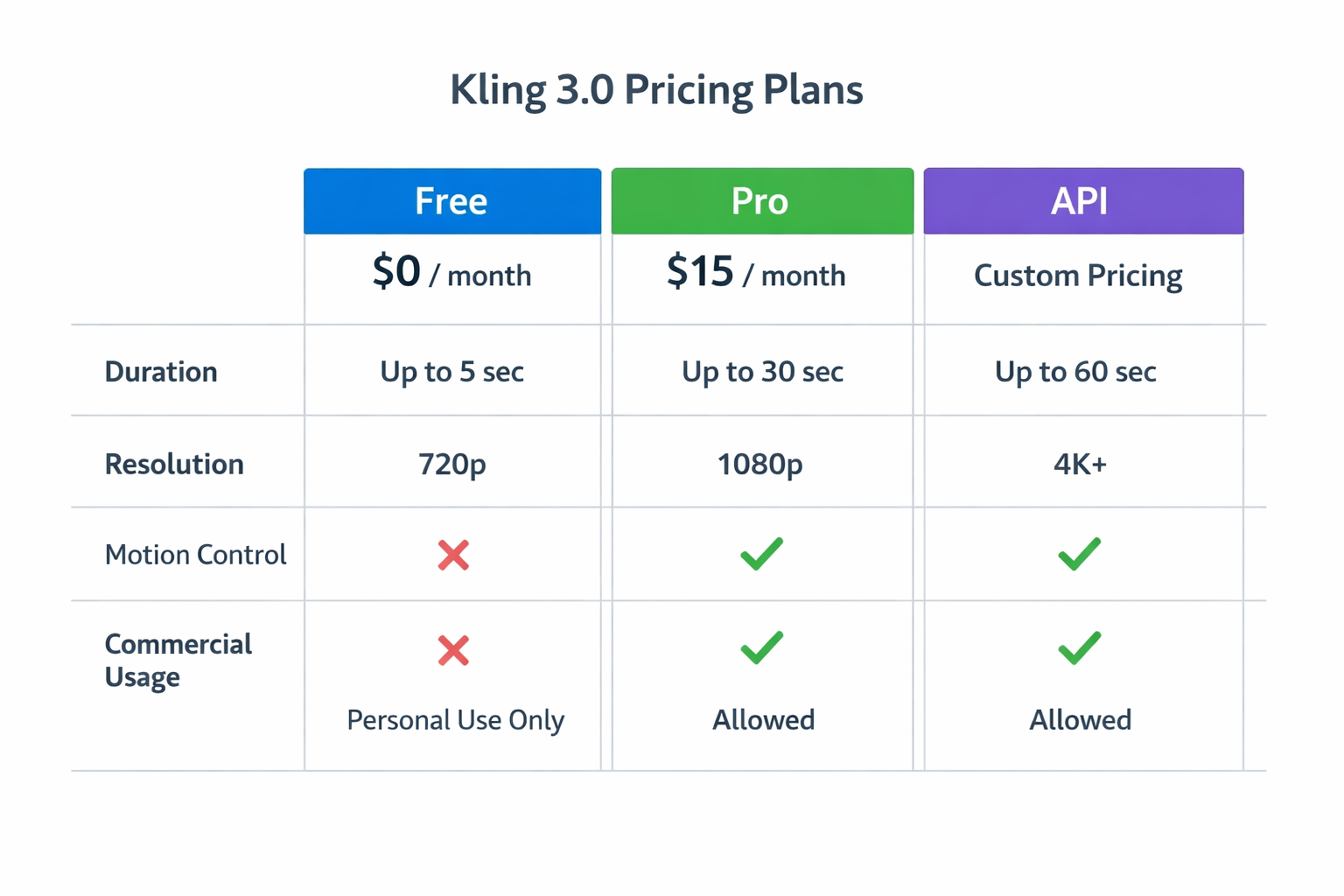
Kling 3.0 Pricing: What the Tiers Typically Mean
Free Plan
Best for first-time testing and low-stakes exploration.
Strengths:
- No upfront commitment
- Good for learning prompt-motion interactions
- Useful for early concept validation
Limits:
- Lower output ceiling
- Limited daily throughput
- Less efficient for deadline work
Pro Plan
Best for creators who publish frequently.
Strengths:
- Better quality options
- More practical generation headroom
- Stronger fit for recurring content workflows
Limits:
- Requires monthly commitment
- Still needs disciplined parameter control to maximize value
API / Custom Plan
Best for teams, agencies, and product workflows.
Strengths:
- Pipeline automation
- Batch execution
- Better operational control
Limits:
- Requires implementation effort
- Requires process maturity to fully benefit
The Real Budget Formula I Use
Here is my working formula:
Monthly Cost / (Total Clips x Usable Rate) = Cost per Usable Clip
If one plan gives higher usable rate, it can outperform a cheaper plan immediately.
Example logic:
- Plan A is cheaper, but usable rate is low because your workflow needs heavy motion consistency.
- Plan B costs more, but usable rate is much higher and iteration is faster.
Plan B often wins in real projects.
Free vs Pro: How I Decide in 10 Minutes
I run a quick decision checklist.
Use Free if:
- You are still learning motion control basics.
- You are validating concepts, not delivering campaigns.
- Your schedule can tolerate re-runs.
Use Pro if:
- You publish regularly.
- You need predictable throughput.
- You care about commercial output quality and speed.
Use API if:
- You operate at scale.
- You need automation, not manual clicking.
- You manage repeatable shot templates across projects.
What Actually Increases Cost (and How to Prevent It)
1) Changing Too Many Variables Per Run
This is the number-one budget killer.
If you change prompt style, motion_score, and camera settings at the same time, you cannot identify what caused improvement.
Fix:
- One variable per run
- Keep a tiny result log
- Promote winning setups to reusable templates
2) Starting at High Motion by Default
High motion can look impressive, but it also increases failure risk in many scenes.
Fix:
- Run low → medium → medium-high ladder
- Select the highest stable range
3) Weak Reference Clips
A bad reference clip creates noisy motion transfer. You pay for retries.
Fix:
- Use clearer references
- Avoid chaotic camera movement in source
4) No Team Standard
When each editor uses different settings, cost and quality become unpredictable.
Fix:
- Define shared presets
- Define pass/fail quality rubric
My Practical Cost Strategy for Different User Types
Solo Creator
Goal: consistent output without overpaying.
My recommendation:
- Start Free for 1 to 2 weeks.
- Track usable rate.
- Move to Pro when output demand becomes regular.
Key KPI:
- Weekly usable clips per hour of work
Small Team (2 to 8 people)
Goal: reduce revisions and handoff friction.
My recommendation:
- Standardize prompt template.
- Standardize motion_score ranges by shot type.
- Use shared review rubric.
- Move to API only when manual workload becomes bottleneck.
Key KPI:
- Revisions per final approved clip
Agency / Production Workflow
Goal: maximize throughput and predictability.
My recommendation:
- Build shot-type libraries.
- Integrate API orchestration where repeat demand exists.
- Keep manual review gate for final approval.
Key KPI:
- Delivery cycle time per batch
Where Motion Control Changes Pricing Outcomes
If your content depends on stable movement, motion control is not “nice to have.” It is cost control.
Why?
Because unstable motion creates retries. Retries consume credits and production time.
When you use Kling 3.0 Motion Control correctly:
- Usable rate rises.
- Retry count drops.
- Cost per final clip drops.
This is the part many pricing pages do not explain.
How to Estimate Monthly Cost Before You Commit
I use this planning table:
- Planned clips per month
- Estimated usable rate
- Average retries per final clip
- Target turnaround speed
- Team time value
Then I estimate three scenarios:
- Conservative (low usable rate)
- Expected (normal usable rate)
- Optimized (template-driven workflow)
If your optimized case requires repeatable volume, Pro or API is usually justified.
Licensing and Commercial Risk
Never skip this step.
Before launching paid campaigns, confirm:
- Commercial usage rights for your tier
- Platform-specific usage restrictions
- Client contract compliance requirements
The cheapest plan is never worth legal ambiguity.
The Best Companion Reads Before You Buy
To improve usable rate before scaling spend:
- How to Use Kling 3.0 Motion Control
- Kling 3.0 vs Omni vs Higgsfield
- Kling 3.0 Documentation API Motion Score Guide
- Kling 3.0 Motion Control Tool
My 30-Day Pricing Playbook
If you want a practical rollout plan, use this:
Week 1
- Test references
- Build base prompt format
- Measure usable rate
Week 2
- Build motion_score ranges
- Add camera intent standards
- Log failures and fixes
Week 3
- Package winning combos into templates
- Validate repeatability
Week 4
- Recalculate cost per usable clip
- Decide whether to stay Free, move to Pro, or prepare API integration
This method prevents emotional plan decisions.
A Simple Calculator Template You Can Reuse
When teams ask me for one practical pricing artifact, I suggest a shared sheet with seven columns:
- Project type
- Planned final clips
- Average retries per final clip
- Total generations
- Usable rate
- Monthly platform cost
- Cost per usable clip
Then add one more column called decision note.
This note forces discipline. Instead of saying “Pro feels expensive,” you write “Pro reduces retries from 4.2 to 2.1 in product-reveal workflow, lowering usable clip cost by 31%.”
That one habit turns pricing from opinion into operating data. It also makes upgrade conversations with co-founders, editors, or clients much easier because the tradeoff is visible, measurable, and tied to delivery outcomes.
The Bottom Line
Kling 3.0 pricing is not really about monthly sticker price.
It is about output economics.
If you only compare plan cost, you can pick the wrong tier.
If you compare cost per usable clip, you usually make the right decision.
My rule:
- Learn with Free.
- Produce with Pro.
- Scale with API.
Use that sequence, and your spend will match your real production maturity.