I tested Kling 3.0, Omni, and Higgsfield the way most creators actually work: same reference quality, similar prompt intent, repeat runs, and strict pass/fail criteria.
No hype, no fanboy takes, no “one clip looked cool so it wins.”
If you are trying to choose between these tools for motion-heavy AI video, this guide will save you time, credits, and rework.
The Real Question You Should Ask
Most comparisons ask “which model is best?”
That is the wrong question.
The right question is:
Which model gives the highest usable output rate for your workflow?
A tool can produce impressive demos and still fail in production if consistency is poor.
My Test Framework (So You Can Reproduce It)
I evaluated all three models with the same rubric:
- Motion consistency over full clip
- Camera intent adherence
- Subject integrity under movement
- Prompt reliability across reruns
- Iteration speed
- Cost per usable clip
And I tested three practical use cases:
- Creator-style short performance video
- Product reveal with controlled camera movement
- Branded social ad with subject continuity requirements
High-Level Verdict
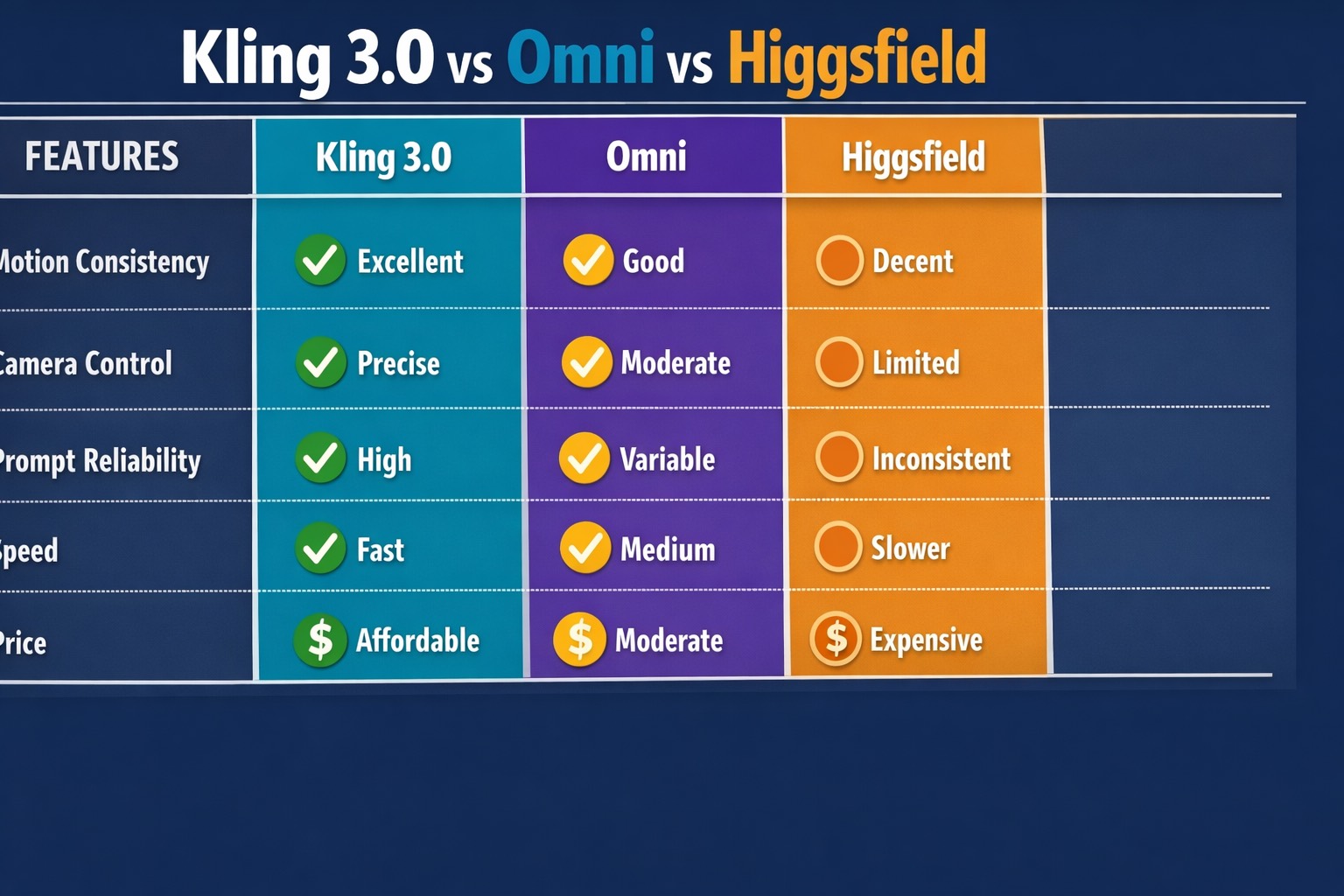
If your priority is reliable motion transfer and controlled camera behavior, Kling 3.0 Motion Control is currently the most operationally predictable option in my tests.
If your priority is experimentation and stylistic variance, Omni can be attractive in certain scenes.
If your priority is quick exploration with lower setup overhead, Higgsfield can work, but consistency ceilings show up earlier under complex motion.
Category-by-Category Breakdown
1) Motion Consistency
This is the core factor.
- Kling 3.0: best stability in low-to-medium and medium-high movement ranges
- Omni: good results in selected runs, more variance across reruns
- Higgsfield: acceptable for simpler motion, weaker under layered movement complexity
What this means in practice:
If you need repeatable output over multiple clips, Kling 3.0 reduces the “lottery effect.”
2) Camera Control Precision
- Kling 3.0: clearer response to explicit camera language (tracking, push-in, locked frame)
- Omni: moderate camera adherence, occasional improvisation
- Higgsfield: workable for basic intent, less precise in nuanced tracking behavior
If your storyboard depends on camera discipline, this category matters more than raw style quality.
3) Subject Integrity During Movement
- Kling 3.0: stronger retention of body proportions in controlled ranges
- Omni: decent, but can drift when intensity rises
- Higgsfield: more vulnerable to body and face inconsistencies in faster sequences
For ad and commercial workflows, integrity breaks are expensive because they trigger full reruns.
4) Prompt Reliability
- Kling 3.0: high repeatability when using structured prompts
- Omni: creative but less deterministic run-to-run
- Higgsfield: acceptable for straightforward prompts, weaker with complex constraints
If your team requires deterministic behavior, predictability usually beats occasional brilliance.
5) Generation Speed and Throughput
- Kling 3.0: fast enough for iterative production loops
- Omni: medium speed in my tests
- Higgsfield: can be slower in certain conditions
Speed alone is not the decision maker, but it compounds with usable rate.
6) Pricing and Output Economics
It is not enough to compare plan pricing.
Use this formula:
Monthly cost / (total runs × usable rate) = cost per usable clip
In my tests, Kling 3.0 often produced better output economics for motion-critical workloads because it wasted fewer runs.
Where Each Tool Wins
When Kling 3.0 Wins
- You need motion transfer that survives reruns
- Camera behavior must follow explicit intent
- You run repeatable client workflows
- You care about predictable quality at scale
When Omni Wins
- You prefer broader stylistic exploration
- You accept higher output variance
- You prioritize creative range over deterministic control
When Higgsfield Wins
- You need quick concept drafts
- Motion complexity is limited
- You are in exploration mode, not strict production mode
Common Mistake: Testing Without Control Variables
Many comparisons online are misleading because they do this:
- Different references per model
- Different prompt structures per model
- No rerun consistency testing
That is not a comparison, it is a highlight reel.
If you want a real answer, keep references, prompt skeleton, and evaluation criteria constant.
My Prompt Structure for Fair Comparison
I used the same scaffold for each model:
- Subject identity
- Scene context
- Camera intent
- Motion behavior
- Quality constraints
- Negative constraints
Example:
A female athlete in black training outfit running on a wet neon street at night, smooth tracking shot from front-left angle, controlled forward momentum, high temporal coherence, avoid jitter, avoid limb distortion, avoid sudden zoom shifts.
This keeps comparisons useful and reproducible.
What I Learned About Kling 3.0 vs Omni vs Higgsfield
Lesson 1: Consistency beats peak quality in production
A single perfect output does not matter if the next five runs fail.
Lesson 2: Camera control quality is a multiplier
Strong camera adherence improves storytelling, editing efficiency, and client approval speed.
Lesson 3: Motion-heavy workflows expose model weaknesses fast
Static beauty tests do not predict motion reliability.
Decision Tree You Can Use Today
Choose Kling 3.0 if:
- You deliver client-facing video regularly
- You need stable motion transfer
- You require camera precision
- You optimize for usable clip economics
Choose Omni if:
- You are still exploring style direction
- You can tolerate run variance
- Your workflow rewards experimentation
Choose Higgsfield if:
- You want low-friction ideation
- You do not need strict motion reproducibility
- You are validating concepts quickly
How This Connects to Pricing and API Strategy
Your model choice should match your commercial stage.
- Exploration stage: accept more variance, lower commitments
- Production stage: prioritize consistency and throughput
- Scaling stage: prioritize automation and standardization
If you are deciding budget first, read Kling 3.0 Pricing: Free Plan, Pro Cost, API Credits.
If you are implementing production controls, read Kling 3.0 Documentation API Motion Score Guide.
If you are still building baseline workflow, start with How to Use Kling 3.0 Motion Control.
My Recommended Testing Protocol Before You Commit
Run this 3-day mini benchmark:
Day 1
- Build one fixed prompt skeleton
- Select two clean references
- Run low/medium/high motion variants on each model
Day 2
- Score each run with the same rubric
- Re-run best variants to test repeatability
- Log pass/fail by use case
Day 3
- Calculate cost per usable clip
- Compare turnaround time
- Pick model by economics, not excitement
This process is simple, but it prevents expensive tool churn.
The Bottom Line
For motion-control-first workflows, my practical ranking is:
- Kling 3.0 (best operational consistency)
- Omni (strong creative range, more variance)
- Higgsfield (good for ideation, weaker for strict repeatability)
Your “best model” is not the one with the prettiest single output.
It is the one that gives you stable, usable, repeatable results under deadline pressure.
If that is your goal, start your benchmark with Kling 3.0 Motion Control and evaluate every tool against the same production rubric.